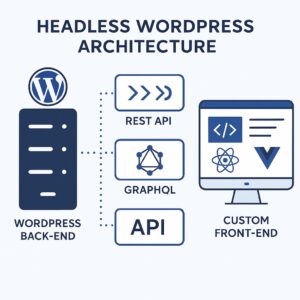
Headless WordPress is architecturally fast: content is pre-rendered to static HTML and served from a CDN edge node close to the visitor, with no PHP execution on the critical path. But the architecture only gives you the ceiling; hitting it requires deliberate choices about rendering strategy, image handling, data fetching, and bundle size. This guide covers the decisions that actually move the needle on Lighthouse scores and Core Web Vitals for a Next.js + WordPress stack.
If you’re still deciding whether headless is the right approach for your project, the headless WordPress pros, cons and use cases guide covers the trade-offs before you commit to the architecture.
The Rendering Strategy Decision
Next.js gives you four rendering modes, and the one you choose per route determines how fast pages load and how fresh the content is.
Static Site Generation (SSG) builds HTML at deploy time. Every visitor gets the same pre-rendered file from a CDN edge node, and Time to First Byte (TTFB) under 50ms is achievable. The downside: content stays frozen until the next deploy. For a WordPress site that publishes several times a week, waiting for a full rebuild on every post update is impractical.
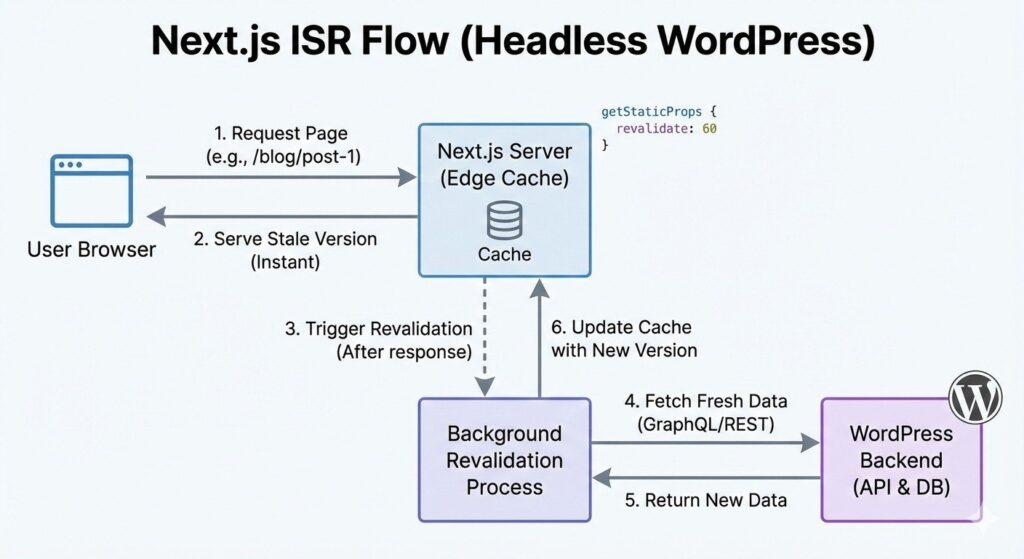
Incremental Static Regeneration (ISR) adds a revalidate interval to SSG. The first visitor after the interval triggers a background regeneration; subsequent visitors get the new version. You keep CDN-speed delivery while content refreshes automatically. A revalidate: 3600 setting means pages are at most one hour stale: acceptable for most blogs, too slow for news or stores.
On-demand revalidation is the best of both: pages are statically cached until a WordPress webhook fires, triggering revalidatePath for exactly the page that changed. Content goes live within seconds of a publish. The webhook setup section below has the WordPress hook, the Next.js route handler and the signature check.
React Server Components (App Router only) render on the server on every request but ship zero client-side JavaScript for the component itself. For pages that are mostly read-only content, Server Components combined with fetch caching give you near-static speed with request-time freshness.
| Mode | When HTML is built | Freshness | Best for |
|---|---|---|---|
| SSG | Deploy time | Until next deploy | Rarely-changing pages (about, pricing) |
| ISR (time-based) | Deploy + background regen | Within interval (e.g. 1hr) | Blogs, news with tolerance for lag |
| On-demand revalidation | Deploy + on publish webhook | Seconds after publish | Most WordPress sites |
| Server Components | Every request (cached) | Per fetch cache config | Dynamic pages needing request-time data |
Pages Router: getStaticPaths + ISR
For projects on the Pages Router, getStaticPaths tells Next.js which post slugs to pre-render at build time, and getStaticProps with a revalidate value adds ISR. Use fallback: 'blocking' so that new posts published after the last build are served on first request. Next.js fetches them server-side, caches the result, and serves HTML for all subsequent requests.
// pages/posts/[slug].js  (Pages Router + REST API + ISR)

export async function getStaticPaths() {
  const res = await fetch(
    'https://api.yourdomain.com/wp-json/wp/v2/posts?per_page=100&_fields=slug'
  );
  const posts = await res.json();

  return {
    paths: posts.map((p) => ({ params: { slug: p.slug } })),
    fallback: 'blocking', // serve on first request, then cache
  };
}

export async function getStaticProps({ params }) {
  const res = await fetch(
    `https://api.yourdomain.com/wp-json/wp/v2/posts?slug=${params.slug}&_fields=id,title,content,date,featured_media`
  );
  const [post] = await res.json();

  if (!post) return { notFound: true };

  return {
    props: { post },
    revalidate: 3600, // ISR: regenerate at most once per hour (or use webhooks)
  };
}
The _fields query parameter on the WordPress REST API is a significant performance lever: it limits the response to only the fields you need. Fetching a full post object returns ~30 fields including raw content, rendered content, embedded media objects, and metadata. Specifying _fields=id,title,content,date,featured_media cuts the payload by 60–70%, which matters both for build time and for on-demand revalidation latency.
App Router: generateStaticParams and Server Components
The App Router replaces getStaticPaths with generateStaticParams and getStaticProps with direct fetch calls inside Server Components. The next: { revalidate } option on fetch is the equivalent of the revalidate key in getStaticProps.
// app/posts/[slug]/page.js  (App Router + REST API)

// Pre-render known slugs at build time
export async function generateStaticParams() {
  const posts = await fetch(
    'https://api.yourdomain.com/wp-json/wp/v2/posts?per_page=100&_fields=slug',
    { next: { revalidate: 3600 } }
  ).then((r) => r.json());

  return posts.map((p) => ({ slug: p.slug }));
}

// Page component runs as a React Server Component by default (zero client JS)
export default async function PostPage({ params }) {
  const [post] = await fetch(
    `https://api.yourdomain.com/wp-json/wp/v2/posts?slug=${params.slug}&_fields=id,title,content,date`,
    { next: { revalidate: 3600 } }  // time-based ISR, or omit if using webhooks
  ).then((r) => r.json());

  if (!post) notFound();

  return (
    <article>
      <h1 dangerouslySetInnerHTML={{ __html: post.title.rendered }} />
      <div dangerouslySetInnerHTML={{ __html: post.content.rendered }} />
    </article>
  );
}
The key App Router advantage for a headless WordPress site: Server Components ship zero JavaScript to the browser for the component itself. A post page that renders WordPress HTML content via dangerouslySetInnerHTML sends no client-side bundle for that component, only the HTML string. For content-heavy pages with minimal interactivity, this alone can cut Total Blocking Time to near zero.
The choice between REST API and GraphQL doesn’t change the App Router patterns above; you substitute the fetch call body. For a comparison of which gateway makes sense for different project types, see the REST API vs GraphQL guide.
Image Optimisation: next/image with WordPress Media
WordPress stores full-resolution images; next/image resizes, converts to WebP or AVIF, and lazy-loads them automatically, but it refuses to proxy images from external domains unless you explicitly allow the host in next.config.js.
// next.config.js
/** @type {import('next').NextConfig} */
const nextConfig = {
  images: {
    remotePatterns: [
      {
        protocol: 'https',
        hostname: 'api.yourdomain.com',   // your WordPress backend domain
        pathname: '/wp-content/uploads/**',
      },
    ],
    formats: ['image/avif', 'image/webp'], // serve AVIF first, fallback WebP
  },
};

module.exports = nextConfig;
Once the remote pattern is registered, use next/image for all WordPress featured images:
// Using next/image with a WordPress featured image URL
import Image from 'next/image';

export default function FeaturedImage({ src, alt, width, height }) {
  return (
    <Image
      src={src}           // full URL from WordPress _embedded or featured_media
      alt={alt}
      width={width}
      height={height}
      sizes="(max-width: 768px) 100vw, 800px"
      priority            // add this on above-the-fold images to improve LCP
    />
  );
}
Two decisions here directly affect Largest Contentful Paint (LCP): the sizes attribute tells the browser which image dimensions to request at different viewport widths (prevents downloading a 1200px image on a 375px mobile screen), and the priority prop on the above-the-fold featured image disables lazy loading for it. Lazy loading the hero image is one of the most common causes of poor LCP scores on headless WordPress sites.
Core Web Vitals: What Headless Fixes and What It Doesn’t
Headless WordPress addresses a specific class of performance problems: server response time and TTFB (because PHP is no longer in the critical path), render-blocking resources (because Next.js handles CSS and JS bundling with better defaults than most WordPress themes), and image delivery (via next/image). It does not automatically fix:
- LCP: still depends on image optimisation (
priorityprop, correctsizes, WebP/AVIF), font loading strategy, and what the first visible content on the page actually is - INP (Interaction to Next Paint): determined by your React component architecture; a client component with a heavy third-party script can produce worse INP than a well-optimised WordPress theme
- CLS (Cumulative Layout Shift): still requires explicit
widthandheighton images and reserving space for lazy-loaded embeds
For a broader look at Core Web Vitals targets and measurement, the Core Web Vitals guide covers LCP, INP, and CLS thresholds and how to audit them in PageSpeed Insights and Chrome DevTools.
Caching and Headers
Vercel sets Cache-Control: public, max-age=0, must-revalidate on ISR pages by default. The CDN serves pages from the edge cache but invalidates the entry on each background regeneration. For pages using time-based ISR, Vercel automatically manages stale-while-revalidate behaviour without additional configuration.
If you’re self-hosting on a VPS rather than Vercel, configure your CDN (Cloudflare, Fastly, or nginx proxy cache) to respect s-maxage from the Next.js response and bypass cache on the x-prerender-revalidate header that on-demand revalidation sends. Self-hosted ISR requires more CDN configuration than the managed Vercel path.
How Do You Refresh Next.js Pages When a WordPress Post Changes?
Send a signed webhook from WordPress whenever a post is published, edited or unpublished, and have a Next.js Route Handler call revalidatePath for that post and for the listing pages that show it. The next visitor gets a freshly rendered page, so edits appear within seconds without a full rebuild or a short ISR interval.
The WordPress side: hook the status change
Use the transition_post_status hook instead of save_post. It receives the old and the new status, so one function catches a post going live, an edit to a live post, and a live post being moved to draft or trash. A save_post handler that only checks for publish misses that last case, and an unpublished post stays visible on the frontend until the next deploy.
// wp-config.php
define( 'NEXT_REVALIDATE_URL', 'https://www.example.com/api/revalidate' );
define( 'NEXT_REVALIDATE_SECRET', 'paste-output-of-openssl-rand-hex-32' );

// functions.php or a small site plugin
add_action( 'transition_post_status', 'ak_notify_nextjs', 10, 3 );

function ak_notify_nextjs( $new_status, $old_status, $post ) {
    if ( 'post' !== $post->post_type || wp_is_post_revision( $post ) || wp_is_post_autosave( $post ) ) {
        return;
    }
    // Only posts that are live, or were live until this change.
    if ( 'publish' !== $new_status && 'publish' !== $old_status ) {
        return;
    }

    // Trashed posts get a "__trashed" suffix on their slug; send the original.
    $slug = preg_replace( '/__trashed$/', '', $post->post_name );
    $body = wp_json_encode( array( 'slug' => $slug ) );

    wp_remote_post( NEXT_REVALIDATE_URL, array(
        'timeout'  => 3,
        'blocking' => false,
        'headers'  => array(
            'Content-Type'   => 'application/json',
            'X-WP-Signature' => hash_hmac( 'sha256', $body, NEXT_REVALIDATE_SECRET ),
        ),
        'body'     => $body,
    ) );
}
The request is non-blocking, so a slow or offline frontend never delays an editor clicking Update. The trade-off is that a lost request isn’t retried. Keep a long time-based revalidate value, such as one day, on the post route as a safety net, and a missed webhook then costs a stale page for hours instead of until the next deploy.
The Next.js side: verify, then revalidate
// app/api/revalidate/route.js
import { createHmac, timingSafeEqual } from 'node:crypto';
import { revalidatePath } from 'next/cache';

export async function POST(request) {
  // Read the raw text: the signature covers these exact bytes.
  const body = await request.text();
  const expected = createHmac('sha256', process.env.REVALIDATE_SECRET).update(body).digest();
  const received = Buffer.from(request.headers.get('x-wp-signature') ?? '', 'hex');

  // timingSafeEqual throws when lengths differ, so compare lengths first.
  if (received.length !== expected.length || !timingSafeEqual(received, expected)) {
    return Response.json({ revalidated: false }, { status: 401 });
  }

  const { slug } = JSON.parse(body);
  if (typeof slug !== 'string' || !/^[a-z0-9%-]+$/i.test(slug)) {
    return Response.json({ revalidated: false }, { status: 400 });
  }

  revalidatePath(`/posts/${slug}`);
  revalidatePath('/posts'); // the listing page that shows this post
  return Response.json({ revalidated: true, slug });
}
Three details in this handler prevent the failures I see most often. The body is read with request.text() before parsing, because the signature has to be checked against the exact bytes WordPress signed. The length check runs before timingSafeEqual, which throws an error instead of returning false when the two buffers differ in length. And the listing page is revalidated alongside the post, otherwise a new or retitled post stays missing from the blog index.
Signing the body with HMAC is stronger than sending a shared token in a header. The secret itself never travels with the request, and any change to the payload breaks the signature. Store the same secret in wp-config.php and in the Next.js environment variables, never in the repository.
According to the Next.js revalidatePath reference, calling it from a Route Handler marks the path as stale, and the page is rebuilt on its next visit, not at the moment the webhook arrives. If you rewrite /blog to /posts, pass the destination route, because the cache is keyed by the route file. On the Pages Router, the equivalent is await res.revalidate(`/posts/${slug}`) inside an API route.
To test before deploying, run the dev server behind a tunnel such as ngrok, point NEXT_REVALIDATE_URL at it, update a post, and confirm the handler returns 200 with revalidated: true. Then trash the same post and check that its URL returns a 404 on the next visit.
Bundle Size and Code Splitting
Next.js automatically code-splits at the page level, but client components that import large libraries ship those libraries to the browser. Two patterns that keep bundles small on a headless WordPress site:
- Use Server Components for content rendering: components that only display WordPress HTML don’t need to be client components and don’t ship JavaScript at all
- Dynamic imports for interactive widgets: if a page has a comments section, search modal, or newsletter form, use
import dynamic from 'next/dynamic'so those components load only when needed rather than on initial page load
Run next build and check the route analysis output. Next.js prints the JavaScript size for each route. Any route over 100kB of client JavaScript warrants investigation; pages that are mostly WordPress content should be well under 50kB. The WordPress Core Web Vitals guide covers server response time, caching and object caching for the WordPress backend that answers those API requests. Slow REST API responses affect build times and on-demand revalidation latency even when the frontend is optimised.
Font Loading with next/font
Custom fonts are a common source of CLS (layout shift when fonts swap) and LCP delay. next/font downloads Google Fonts at build time and serves them from the same domain: no third-party font request, no FOUT (flash of unstyled text), and font-display: optional by default prevents layout shift. For a headless WordPress site, this replaces the Google Fonts link tag that most WordPress themes add to the document head.
Performance Checklist
- Choose ISR or on-demand revalidation over SSG for any site that publishes more than once a week
- Send a signed webhook on publish, update and unpublish, and revalidate both the post and its listing pages
- Add
images.remotePatternsinnext.config.jsfor your WordPress media domain - Add the
priorityprop on above-the-fold featured images to improve LCP - Set correct
width,height, andsizeson allnext/imageinstances - Use
_fieldson all REST API requests to reduce payload by 60–70% - Prefer Server Components (App Router) for content-only pages: zero client JS shipped
- Use dynamic imports for interactive widgets not needed on initial load
- Replace Google Fonts link tags with
next/font - Run
next buildand investigate any route exceeding 100kB of client JavaScript - Measure Core Web Vitals in PageSpeed Insights against real traffic, since synthetic scores don’t capture INP regressions from client-side interactions
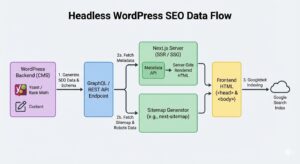
For protected routes (member dashboards or content behind a login), the JWT authentication guide covers how Next.js handles tokens for requests to the WordPress backend without exposing credentials to the browser. For the SEO implications of the headless setup, including how to ensure crawlers see the same content as your visitors, the headless WordPress SEO guide is the companion read.