
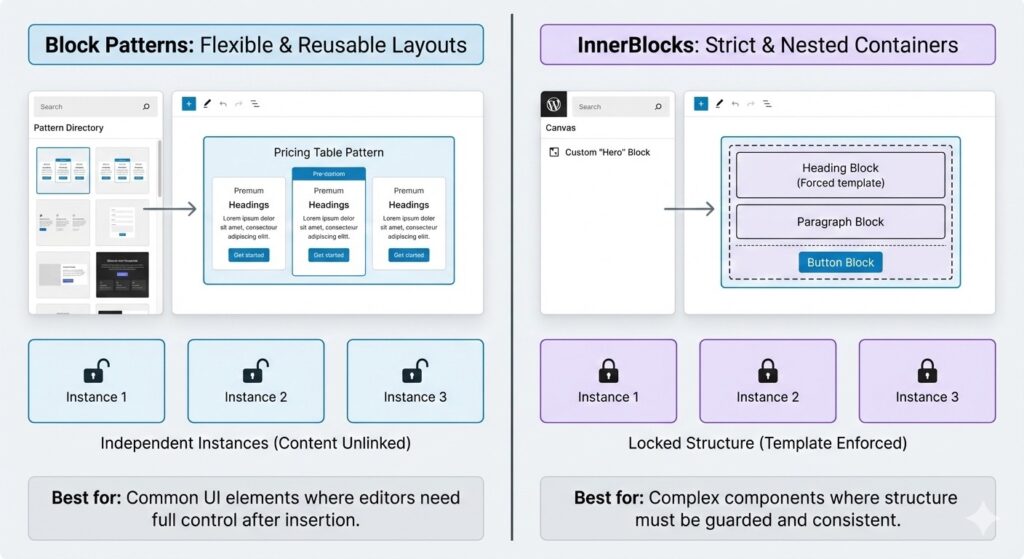
The Power of Block Patterns in Modern Development
A Block Pattern is a collection of pre-configured blocks that can be inserted into a page with one click. Unlike a “Reusable Block,” once a pattern is inserted, it is decoupled from the original source-meaning editors can change the content of one instance without affecting the others.
Why Patterns are Better for SEO
Search engines value clean, semantic HTML. When you use Block Patterns, WordPress generates standard Gutenberg markup. This avoids the “div-soup” often created by page builders or custom PHP templates, leading to better Core Web Vitals and higher rankings.
InnerBlocks: The Secret to Nested Layouts
If you are building a custom block (like a “Card Grid” or “Testimonial Slider”), you often want to allow editors to place other blocks inside it. This is where the InnerBlocks component comes in.
Defining a Template with InnerBlocks
You can restrict which blocks are allowed inside your parent block. For example, if you’re building a “Hero Section,” you can force it to only accept a Heading, a Paragraph, and a Button.
const MY_TEMPLATE = [
    [ 'core/heading', { placeholder: 'Hero Title' } ],
    [ 'core/paragraph', { placeholder: 'Hero description...' } ],
    [ 'core/button', { text: 'Click Here' } ],
];

// Inside your Edit function
<InnerBlocks
    template={ MY_TEMPLATE }
    templateLock="all"
/>
Block Patterns vs. InnerBlocks: When to Use Which?
| Feature | Block Patterns | InnerBlocks (Custom Blocks) |
| Complexity | Low (PHP/JSON based) | High (React based) |
| Editor Control | Full flexibility | Strict & Controlled |
| Best For | Common layouts (Pricing tables, Team sections) | Complex functional components (Tabs, Accordions) |
| Performance | Native (Zero overhead) | Moderate (Requires JS bundle) |
Strategic Implementation: The “Pattern-First” Workflow
To build a high-performance site that ranks well, follow this workflow:
- Register Patterns for UI: Use the register_block_pattern() function in your functions.php. This allows you to categorize your layouts, making them easily discoverable in the “plus” menu.
- Use InnerBlocks for Guardrails: If you need to ensure an editor doesn’t “break” a specific design, wrap your layout in a custom block using InnerBlocks with a locked template.
- Optimize for the API: If you are still using the Headless WordPress REST API, remember that patterns are rendered as HTML in the post_content. This makes them easy to fetch and display in a Next.js frontend.
Conclusion: Why Native Layouts Win
Moving away from proprietary page builders and toward wordpress block patterns vs innerblocks is the best way to future-proof your site. You get the benefit of WordPress core updates, lightning-fast loading speeds, and a cleaner code base that search engines love.
In the next post of this series, we will take this a step further by exploring the Interactivity API-the new standard for adding frontend logic without the bloat of jQuery.