
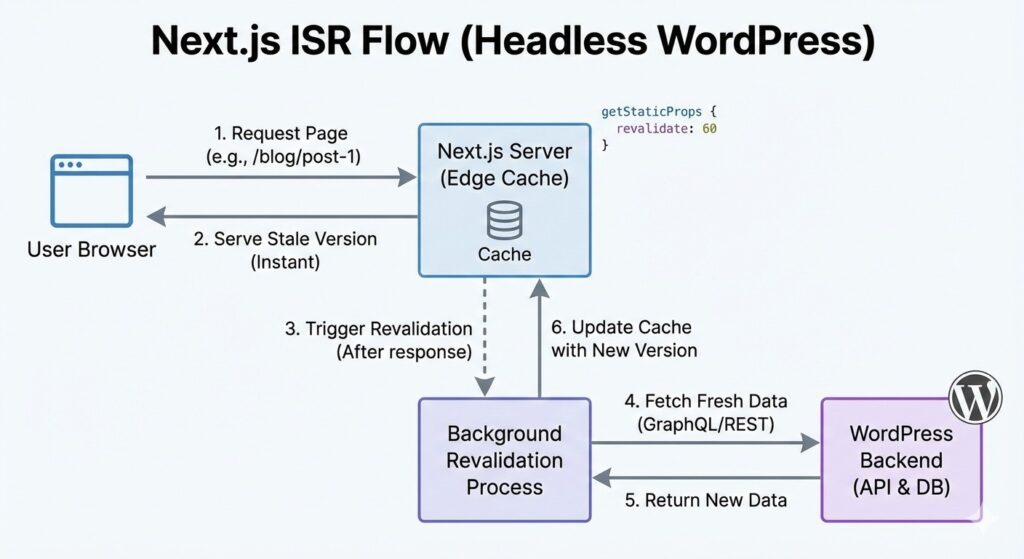
The Rendering Revolution: SSG vs. ISR
In a headless environment, you have several ways to render your content. Understanding the difference is key to headless wp performance.
Static Site Generation (SSG)
With SSG, your site is built once at “build time.” When a user visits, they receive a static HTML file from a CDN. It is incredibly fast, but there is a catch: if you update a post in WordPress, the site won’t show the change until you trigger a new build.
Incremental Static Regeneration (ISR) – The Game Changer
ISR allows you to update static pages after you’ve built your site, without needing to rebuild the entire thing. You can tell Next.js to revalidate a page every 60 seconds.
This is perfect for WordPress sites where content changes frequently but you still want the speed of a static site.
Fetching Data from the Gateway
As we discussed in our post on REST API vs. GraphQL, your choice of gateway will dictate your Next.js code. If you are using WPGraphQL, you can use the getStaticProps function to fetch data directly during the build process.
Example: Fetching a Post List
export async function getStaticProps() {
  const res = await fetch('https://api.yourdomain.com/graphql', {
    method: 'POST',
    headers: { 'Content-Type': 'application/json' },
    body: JSON.stringify({
      query: `
        query AllPosts {
          posts {
            nodes {
              title
              slug
              excerpt
            }
          }
        }
      `,
    }),
  });
  const json = await res.json();
  return {
    props: {
      posts: json.data.posts.nodes,
    },
    revalidate: 60, // This enables ISR
  };
}
Handling Dynamic Routes
In WordPress, you might have thousands of posts. You don’t want to create a React file for each one. Next.js uses Dynamic Routes (e.g., [slug].js) to handle this.
By using getStaticPaths, you can tell Next.js exactly which slugs exist in your WordPress database so it can pre-render them. If a user tries to access a new post that hasn’t been cached yet, Next.js can fetch it on the fly, ensuring your site is always up to date.
Optimizing Media: The Next.js Image Component
One of the biggest performance killers in WordPress is unoptimized images. When you go headless, you can use the next/image component to automatically resize, optimize, and serve images in modern formats like WebP.
This offloads the heavy lifting from your WordPress server to the Next.js frontend, resulting in a significantly higher Lighthouse score and better Core Web Vitals.
Security and Private Data in Next.js
For public posts, fetching data is simple. But what if you are building a member dashboard or a protected portal? This is where your JWT Authentication comes into play.
Next.js can store that JWT in a secure cookie. When a user navigates to a private page, Next.js sends that token back to WordPress to verify the User Roles and Capabilities before displaying the content.
Conclusion
Building with next.js and headless wordpress is about more than just modernizing your stack; it’s about providing a superior user experience. By utilizing ISR and the next/image component, you create a site that feels instantaneous to the user while remaining easy for content editors to manage.
In our next post, we’ll look at how to keep these two systems in sync using Webhooks and Real-Time Updates.