
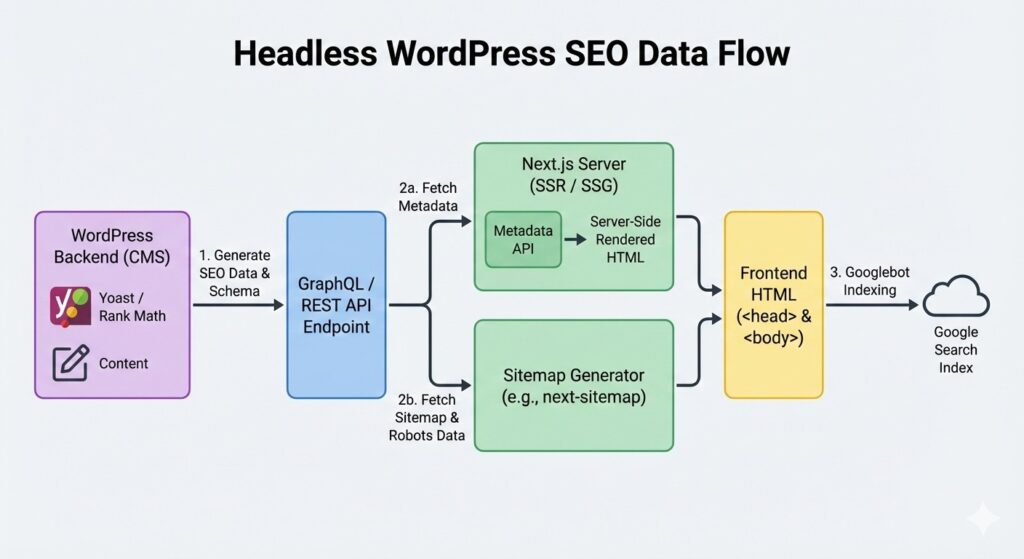
The Core Challenge: Missing Metadata
By default, when you fetch a post via the REST API or GraphQL, you get the content, but you don’t get the SEO titles, descriptions, or Open Graph tags generated by your SEO plugin.
To fix this, you must “expose” your SEO plugin data to the API.
- For REST API: Use a bridge plugin like Yoast SEO to REST API.
- For GraphQL: Use WPGraphQL for Yoast SEO or Rank Math.
Strategy 1: Dynamic Metadata Rendering in Next.js
Once the SEO data is available in your API, your frontend must “inject” it into the <head> of your page. In Next.js, we use the Metadata object (in the App Router) or the Head component (in the Pages Router).
Example: Next.js Metadata Implementation
export async function generateMetadata({ params }) {
  const seoData = await getPostSEO(params.slug); // Fetch from WP API
  return {
    title: seoData.title,
    description: seoData.description,
    openGraph: {
      title: seoData.ogTitle,
      images: [seoData.ogImage],
    },
  };
}
Strategy 2: Handling XML Sitemaps and Robots.txt
Google needs a map to find your content. In a headless setup, WordPress will generate a sitemap pointing to the backend URLs (e.g., api.yoursite.com/post-1), but you need it to point to the frontend (e.g., yoursite.com/post-1).
The Solution:
- Disable the WordPress native sitemap.
- Generate the Sitemap in Next.js: Use the
next-sitemappackage or a custom route handler that fetches all slugs from WordPress and generates a fresh XML file on your frontend domain.
Strategy 3: Schema Markup & Structured Data
Schema markup helps Google understand if your content is an Article, a Product, or a FAQ. When you go headless, the JWT Authentication or public API should also return the JSON-LD schema data.
Make sure your frontend renders this script tag inside the body or head. This is the secret to winning Featured Snippets and “People Also Ask” boxes.
Comparison: Traditional vs. Headless SEO
| Feature | Traditional WordPress | Headless (Next.js) |
| Meta Tags | Automatic via Plugins | Manual Injection via API |
| Page Speed | Limited by Theme/Server | Ultra-Fast (Edge Cached) |
| Sitemaps | Built-in | Custom Generated |
| Core Web Vitals | Hard to Optimize | Native Optimization |
Why Headless SEO Can Actually Outrank Traditional Sites
While the setup is harder, the reward is higher. Google’s Core Web Vitals are a massive ranking factor. Because a Headless site uses On-Demand Revalidation and optimized images, it is almost always faster than a heavy PHP-based theme.
A faster site with the same SEO data will always outrank a slower one.
Conclusion: Your SEO Checklist
To rank on Page 1, your headless site must be:
- Indexable: Ensure your frontend is not set to
noindex. - Data-Rich: Every tag from Yoast/Rank Math must reach the Next.js
<head>. - Fast: Use Next.js performance features to score 90+ on Lighthouse.