
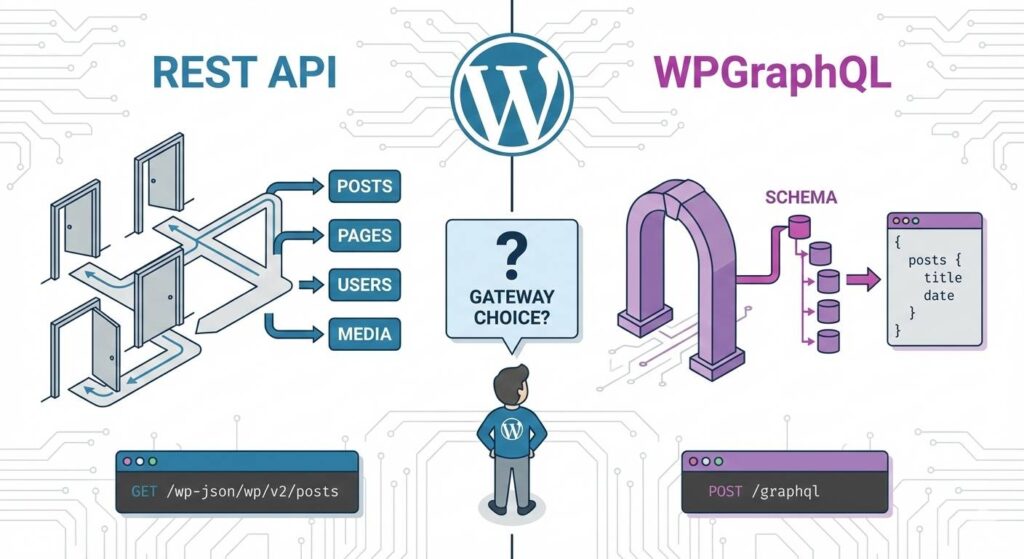
The Evolution of Headless WordPress Architecture
The shift toward a headless approach is part of a broader trend in modern WordPress development. By decoupling the backend, you allow WordPress to do what it does best—content management—while using tools like React or Next.js for the presentation layer.
However, moving data between these two layers requires a robust API. Whether you are implementing custom user roles for restricted data or simply fetching posts, the way you query that data changes your entire workflow.
The Native Standard: WordPress REST API
The REST (Representational State Transfer) API has been part of WordPress core since version 4.7. It is the battle-tested, default way to interact with WordPress data.
Advantages of Using the REST API
- Zero Setup: It is built into core. You don’t need to install any plugins to start fetching data.
- Standardized Patterns: Most developers are familiar with RESTful patterns (GET, POST, DELETE), making onboarding easier.
- Predictable Caching: Since REST uses unique URLs for every resource, it is very easy to cache at the edge using CDNs.
Limitations of the REST Approach
- Over-fetching: A request for a single post returns everything—content, metadata, author details—even if you only need the title.
- The $N+1$ Problem: If you need a post and its associated comments, you often have to make multiple separate HTTP requests, which can lead to performance bottlenecks similar to those we discussed in our guide on background processing and offloading tasks.
The Modern Powerhouse: WPGraphQL
GraphQL is a query language for your API that allows you to request exactly what you need. In the WordPress world, the WPGraphQL plugin is the gold standard.
Why Developers Love GraphQL
- Efficient Data Fetching: You define the shape of the response. If you only want the
titleanddate, that is all the server sends back. - Single Endpoint Architecture: You can fetch Posts, Pages, Menu items, and Custom Fields in a single HTTP request.
- Self-Documenting Schema: The GraphQL IDE allows frontend developers to explore the data structure without needing a backend developer’s help.
Potential Challenges with WPGraphQL
- Plugin Dependency: You must manage the WPGraphQL plugin and its extensions (like for ACF).
- Caching Complexity: Because it often uses POST requests to a single
/graphqlendpoint, it requires more sophisticated caching strategies than the REST API.
Direct Comparison: REST vs. GraphQL
| Feature | WordPress REST API | WPGraphQL |
| Availability | Built into Core | Requires Plugin |
| Data Fetching | Multiple endpoints | Single endpoint |
| Payload Size | Fixed (Often Large) | Flexible (Optimized) |
| Best For | Simple integrations | Complex, data-heavy apps |
Final Verdict: Which Gateway Should You Choose?
For many developers, the choice comes down to the scale of the project. If you are building a small integration, the REST API is excellent because it requires no setup and is already secured by WordPress’s core architecture.
However, if you are building an enterprise-grade application where performance and clean data structures are paramount—similar to the principles we applied when using Dependency Injection for cleaner code—then WPGraphQL is the clear winner. It reduces network overhead and provides a much better developer experience for frontend teams.
Frequently Asked Questions
Is GraphQL faster than REST?
In terms of raw server execution, they are similar. However, GraphQL is usually “faster” for the user because it reduces the amount of data sent over the wire and eliminates multiple round-trip requests.
How do I secure these APIs?
Both require proper authentication. We will cover this in detail in our next post on Implementing JWT Authentication, but ensure your User Roles and Capabilities are correctly configured to prevent data leaks.